Using Observation Diagnostics
The observation diagnostics subsystem provides tools for analyzing observation departures, QC behavior, channel‑wise statistics, and observation‑space performance of the data assimilation system. These diagnostics complement the increment and spectral diagnostics by quantifying how well the background and analysis fields fit the observations. For the mathematical formulation and example figures, see Diagnostics Overview.
Running the CLI Tool
The main driver for observation‑space diagnostics is:
ufsda-obs-diag --yaml --yaml /path/to/obs_diag.yaml
This tool computes O–B and O–A departures, bias, RMS, normalized RMS, bias‑corrected RMS, QC‑filtered statistics, and channel‑wise summaries for satellite and conventional observations.
Example Figure
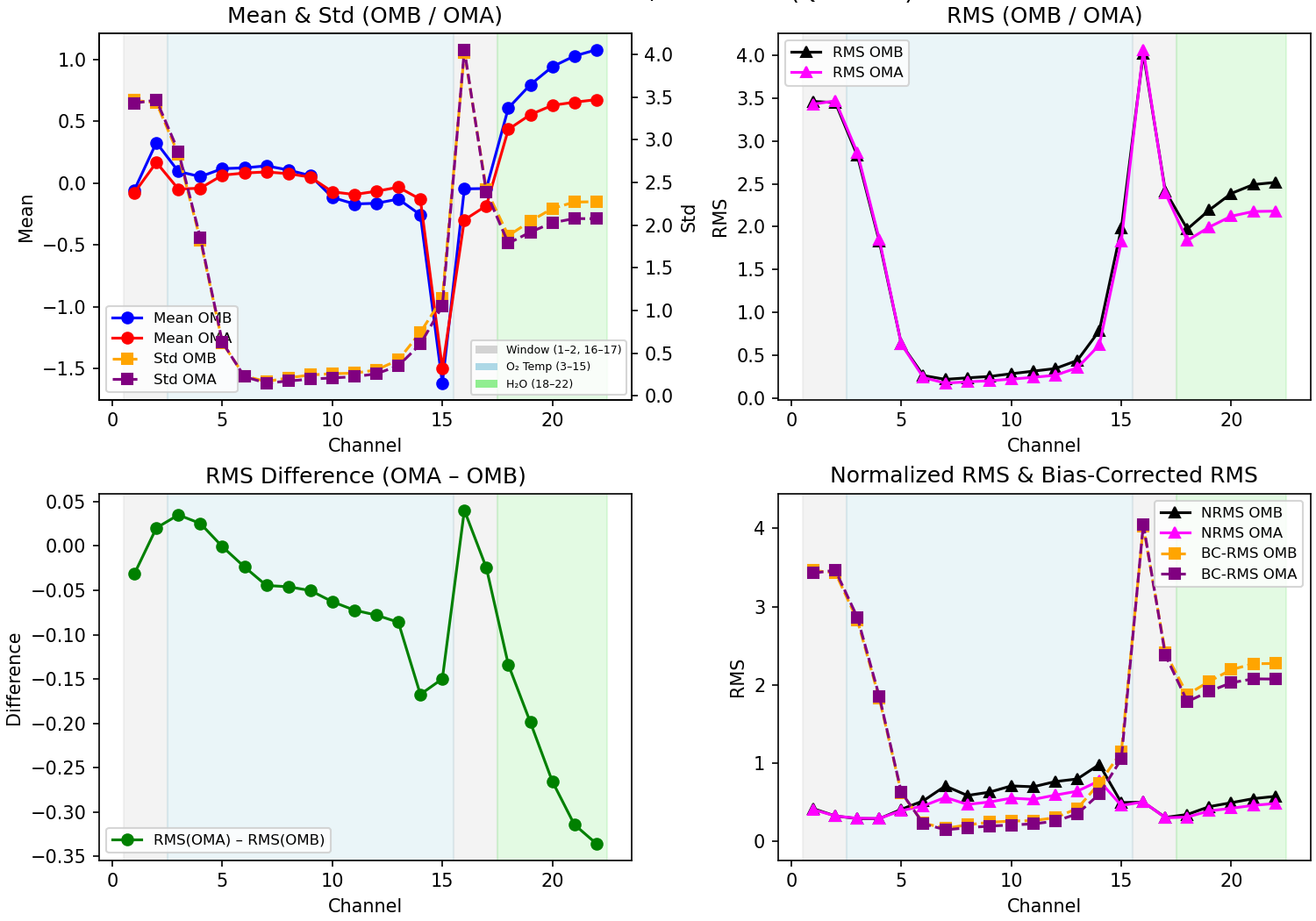
Extended ATMS observation‑space diagnostics showing O–B and O–A bias, RMS, normalized RMS, bias‑corrected RMS, and analysis improvement metrics. These statistics quantify systematic error, total error, random error, and the degree to which the analysis reduces observation‑space departures.
YAML Configuration
A minimal YAML configuration for observation diagnostics:
output_dir: obs_diag/

# Optional: shared prefix for all diagnostic files
prefix_root: /path/to/ioda/diagnostics

observations:
  - label: ATMS
    type: atms
    variable: brightnessTemperature
    file: diag.atms.nc
    diagnostics:
      hist: true
      stats: true
      extended: true
      scanpos: true
      latbins: true

  - label: GNSSRO
    type: scalar
    variable: bendingAngle
    file: diag.gnssro.nc
    diagnostics:
      hist: true

  - label: SATWND
    type: vector
    variable: windSpeed
    file: diag.satwnd.nc
    diagnostics:
      hist: true
Outputs
*_hist/— scalar or vector histograms (e.g., temperature, humidity, winds)scanpos/— ATMS scan‑position diagnosticslatbins/— ATMS latitude‑binned diagnosticsstats/— mean/std statisticsstats_extended/— RMS, NRMS, BC‑RMS diagnostics
These diagnostics provide a detailed view of observation‑space performance and complement the increment and spectral diagnostics.